


Choosing the best software for your career means matching tools to your actual daily tasks, not chasing every popular app. Start with your job’s core needs: writing, organizing, communicating, or creating. Then pick two or three tools that do those jobs well, instead of ten that do them halfway.
Early in your career, the software you choose shapes your habits. Good tools save you time. Bad tools waste it, drain your budget, and create confusion. This guide breaks down exactly how to evaluate, choose, and set up the right software stack for where you are right now.
You don’t need an expensive setup to look professional or work efficiently. You need clarity about your goals and a simple system for testing tools before you commit.
Start by Identifying Your Core Work Tasks
Before you download anything, list the tasks you do most often. This step prevents you from buying software you’ll never fully use.
Write down your top five weekly tasks. Are you writing reports? Managing client calls? Tracking a budget? Designing graphics? Your task list points directly to the software categories you need.
Group Tasks Into Categories
Once you have your task list, sort it into simple groups:
- Communication – email, video calls, messaging
- Organization – calendars, to-do lists, project boards
- Creation – documents, spreadsheets, design work
- Storage – file backup and sharing
This grouping keeps you focused. You’re shopping for solutions to real problems, not collecting apps.
Compare Free vs. Paid Software Options
Free software works well for most beginners, but paid tools earn their cost once your workload grows. Test the free version first. Upgrade only when you hit a real limit.
Many free tools now match paid competitors on core features. Google Workspace’s free tier, for example, covers documents, spreadsheets, and email for individual use. Paid versions usually add storage, advanced automation, or team management features you may not need yet.
Signs You’ve Outgrown the Free Version
Watch for these signals before you upgrade:
- You hit storage or user limits weekly.
- You need integrations the free plan blocks.
- Manual work eats hours you could automate.
- Client or employer requirements demand a specific paid tool.
If none of these apply, stay on the free plan. Save the money and reinvest it later, once your career needs actually justify the cost.
Check Compatibility With Your Industry and Team
The best software fits your industry’s standards, not just your personal preference. A tool your team or clients can’t open creates more friction than it solves.
Ask your manager or peers which software your workplace uses as its standard. If your company runs on Microsoft 365, learning that ecosystem well beats mastering a competing tool nobody else touches. According to industry experts, workplace software adoption often depends more on team consistency than on which tool performs best on paper.
Questions to Ask Before You Choose
- Does this software integrate with what my team already uses?
- Can I export files in formats others can open?
- Will this tool still work if I switch jobs?
- Does my industry have an unspoken “default” tool?
Answering these questions early saves you from relearning a new system later.
Evaluating Software: The One-Week Trial Standard
Every critical tool decision requires a structured evaluation period, as first impressions rarely expose the subtle friction points that emerge during routine use. Reputable software providers routinely offer free trials or freemium tiers designed specifically to help you test real-world workflow integration before committing financially. To gain actionable insights, deploy any prospective platform across at least one full work week while actively measuring task completion times against your current baseline. Once you narrow down your prospective options, learning test productivity apps to find your perfect fit provides the framework needed to make a confident, data-driven final choice.
A Simple Trial Checklist
Run through this checklist during your trial period:
- Does it save you time compared to your current method?
- Can you learn its core features in under an hour?
- Does customer support respond when something breaks?
- Does it work smoothly on your phone and computer?
If a tool fails two or more of these checks, keep looking. Plenty of alternatives exist for nearly every task category.
Prioritize Tools That Scale With You
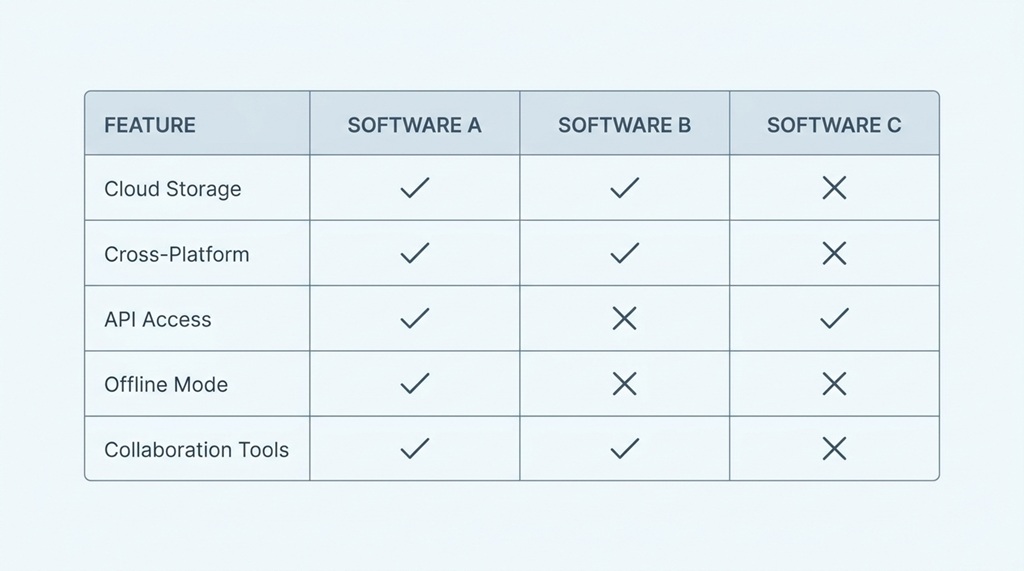
The software you choose today should still make sense a year from now. Pick tools built to grow, so you avoid painful migrations later.
Scalable software offers tiered plans, meaning you can start small and add features as your responsibilities expand. Project management tools like this let a solo freelancer and a ten-person team use the same platform, just at different subscription levels.
Before committing, check whether the software has add-ons, integrations, or higher-tier plans. This tells you whether the company invests in long-term growth or just serves entry-level users. A tool with no upgrade path might force a frustrating switch later, right when you’re busiest.
Protect Your Data and Budget From the Start
Security and cost control matter just as much as features, especially when you’re managing your own subscriptions for the first time. A hacked account or a forgotten charge can cost you far more than a monthly fee.
Choose software from established companies with clear privacy policies. Enable two-factor authentication wherever it’s offered. This single habit blocks most common account breaches.
Budget Tips for Young Professionals
Here’s an angle most guides skip: track your software spending the same way you’d track any other bill. Set a monthly “tools budget” cap, even if it’s just $20. Review your subscriptions every three months and cancel anything you haven’t opened in the last month. Small subscriptions add up fast, and unused tools quietly drain money you could put toward skill-building courses or an emergency fund instead.
Frequently Asked Questions
What’s the best software for someone just starting their career?
Start with a free productivity suite like Google Workspace or Microsoft 365 for documents and email. Add a simple task manager, such as a free to-do list app, to organize your schedule. These cover most entry-level job needs without any upfront cost.
How many software tools should I use at once?
Most people work best with five to eight core tools covering communication, organization, creation, and storage. Adding more than that often creates confusion instead of efficiency. Focus on mastering a few tools deeply rather than juggling many at a shallow level.
Should I pay for software before I even have a job?
Generally, no. Free versions of major tools cover most learning and job-search needs. Wait until an employer or client specifically requires a paid tool, or until you hit a clear limitation, before spending money.
How do I know if a software company is trustworthy?
Check for a clear privacy policy, visible company information, and reviews from real users on independent sites. Established companies with years of operation and transparent data practices are generally safer bets than brand-new, unknown apps. When in doubt, search for recent news about the company’s security history.
Is it bad to switch software often?
Occasional switching is fine when a tool clearly isn’t working for you. Frequent switching without a clear reason wastes time on setup and relearning, though, so give any new tool a fair trial period before you decide to move on.
Conclusion
Choosing the best software for your career comes down to matching tools to real tasks, testing before you commit, and staying open to upgrading as your responsibilities grow. Start free, watch for genuine limitations, and check what your industry and team already use before adding anything new. Protect your accounts, track your spending, and revisit your software choices every few months. With this approach, you’ll build a lean, effective toolkit that supports your career instead of complicating it.

Leave a Reply