


You can learn coding for beginners with zero experience. In fact, you don’t need a degree, and you don’t need to be a “math person.” Instead, you just need a clear plan and the will to practice a little each day.
This guide gives you that plan. First, it walks you through picking a language. Then, it helps you build real skills and move toward your first project or job. There’s no fluff here, and no overwhelming jargon either. Just a simple path forward.
If you’re part of a community focused on growth and independence, coding is one of the most powerful skills you can add to your toolkit. After all, it opens doors to remote work, freelance income, and creative projects you fully control.
Why Coding Is a Smart Skill to Learn Right Now
Coding skills are in high demand, and that demand isn’t slowing down. Today, businesses in nearly every industry need people who can build, fix, or improve software.
However, you don’t need to become a full-time software engineer to benefit. In fact, many young adults use coding to:
- Build a website or app for their own business
- Automate boring, repetitive tasks
- Qualify for higher-paying jobs
- Freelance on their own schedule
- Understand the technology that runs their daily life
On top of that, coding teaches you how to break big problems into small steps. This skill helps you far beyond a computer screen.
Pick One Programming Language to Start With
Choose one beginner-friendly language, then stick with it for at least a few months. If you jump between languages too early, you slow down your own progress and create confusion.
Best Languages for Absolute Beginners
- Python – Easy to read, widely used, and great for beginners
- JavaScript – Powers websites and is useful if you want to build for the web
- HTML/CSS – Not a full programming language, but essential for anyone learning web design
Most beginners start with Python. According to industry experts, its simple syntax makes it easier to grasp core coding concepts without getting lost in complicated rules.
Once you understand the basics in one language, though, learning a second one becomes much easier.
Understand the Core Concepts Before You Rush Into Projects
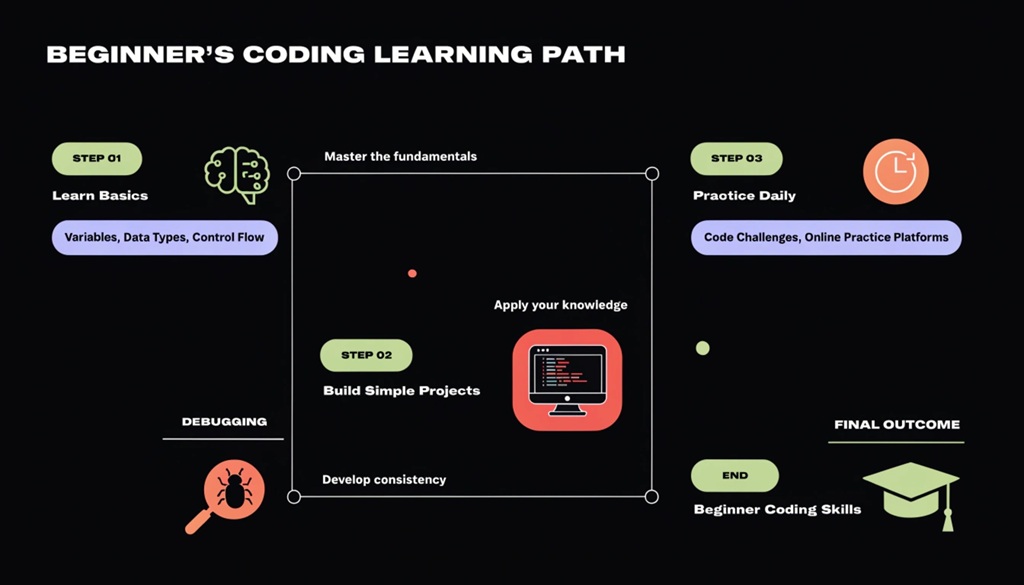
Every programming language shares the same basic building blocks. So, learn these first, and you’ll pick up new tools much faster later on.
Concepts Every Beginner Should Learn
- Variables – How programs store information
- Loops – How programs repeat actions
- Conditionals – How programs make decisions (“if this, then that”)
- Functions – How programs organize reusable blocks of code
- Data structures – How programs organize and store data, like lists or dictionaries
You don’t need to master these overnight, though. Instead, spend time on each one until it clicks. Otherwise, rushing past the basics often causes bigger struggles later.
Use Free or Low-Cost Learning Resources
You don’t need pricey courses to learn coding for beginners. In fact, plenty of good tools exist for free or at low cost.
Popular Options to Explore
- freeCodeCamp – Free, project-based coding curriculum
- The Odin Project – Free full-stack web development path
- Codecademy – Interactive lessons with both free and paid tiers
- YouTube tutorials – Great for visual learners who want step-by-step walkthroughs
- Official documentation – Often overlooked, but a useful resource once you know the basics
Before you commit to one, try a few different platforms. That way, since everyone learns differently, you’ll find the right fit faster, and it makes a big difference in how consistent you stay.
Build Small Projects as You Learn
Watching tutorials alone won’t make you a coder. Building things will. So, start applying new ideas to small projects as early as possible. Learn how to build a personal brand online to attract employers while building your first coding projects.
Beginner Project Ideas
- A simple calculator
- A to-do list app
- A personal portfolio website
- A basic quiz game
- A weather app using a free API
These projects don’t need to be original or impressive. Instead, their purpose is to help the ideas stick in your memory. Plus, each small win builds real confidence.
Here’s an angle most beginner guides skip: keep a “struggle log.” Every time you get stuck, write down what confused you and how you solved it. Over time, this log turns into your own cheat sheet. It also shows you how much progress you’ve made, which helps on the days you feel stuck or discouraged.
Get Comfortable Reading and Fixing Errors
Errors are a normal part of coding, not a sign that you’re failing. In fact, every coder, no matter how skilled, spends time fixing broken code.
How to Handle Errors Like a Pro
- Read the error message slowly, since it usually tells you exactly what went wrong.
- Search the exact error message online, because someone else has likely faced it before.
- Break your code into smaller pieces to isolate the problem.
- Use print statements or a debugger to see what’s happening step by step.
Overall, learning to debug well is one of the most useful coding skills you can build. In fact, it matters more than memorizing syntax.
Join a Coding Community for Support and Accountability
Learning to code alone can feel isolating, especially in the early weeks. That’s why a supportive community keeps you motivated and helps you learn faster.
Where to Find Support
- Online forums like Reddit’s r/learnprogramming
- Discord servers built around coding for beginners
- Local meetups or coding clubs
- Study groups within your existing community
For example, being part of a group that encourages growth, like an empowering young adults community, gives you extra motivation to keep going. As a result, you can share wins, ask questions, and get honest feedback without judgment.
Turn Your Skills Into Opportunities
Once you’ve built a foundation, start thinking about how to use your coding skills. This could mean a job, freelance work, or a personal project that solves a real problem.
Ways to Use Your New Skills
- Build a portfolio website showcasing your projects
- Apply for entry-level tech roles or internships
- Offer freelance services on platforms like Upwork or Fiverr
- Contribute to open-source projects to gain real experience
- Start a small business or tool that solves a problem you personally face
Even so, you don’t need to feel “ready” before you try. In reality, most successful coders started applying for opportunities while they were still learning.
Frequently Asked Questions
How long does it take to learn coding as a beginner?
Most beginners can learn the basics in three to six months with steady practice. After that, becoming job-ready usually takes six months to a year, depending on how much time you give it each week.
Do I need a computer science degree to become a coder?
No, a degree isn’t required to learn coding or land a coding job. Instead, many successful developers are self-taught or learned through bootcamps and free tools.
What is the easiest programming language to learn first?
Python is widely seen as the easiest language for beginners because of its simple, readable style. On top of that, it has strong community support and countless free learning resources.
How much time should I spend learning to code each day?
Even 30 to 60 minutes a day of steady practice beats occasional long study sessions. Ultimately, consistency matters more than intensity when you’re building a new skill.
Can I really get a coding job without prior experience?
Yes, many people land entry-level roles or freelance gigs through personal projects and a strong portfolio. Often, employers care more about what you can build than where you learned it.
Final Thoughts
Learning coding for beginners doesn’t require special talent or a perfect starting point. Instead, it requires a clear plan, steady practice, and the will to make mistakes along the way.
Start by picking one language. Next, learn the core concepts, build small projects, and join a community. Then, apply your skills sooner than you think you’re ready. In the end, every skilled coder started exactly where you are right now: at zero.

Leave a Reply